Retention Policy for document library in SharePoint 2010
SharePoint is emerging as an enterprise level content
management system. Usually enterprises load all the records to the ECM
system. Most of the records are not relevant after a few years. These
documents need to be removed from the ECM System. Over the years
SharePoint is emerging as an Enterprise ECM and it allows its users to
easily setting up document retention policies. Retention policy
specifies how a document is disposed.
One of the major
improvements in SharePoint 2010 compared to prior version is the
improvements in information management policies. SharePoint 2010 can
apply the expiration policy in multiple stages, where each stage can do
some specific actions such as deleting draft versions, deleting previous
versions , deleting the record etc. In SharePoint 2010 you can apply
the retention policy to a content type, to a list or document library,
to a folder.
For the purpose of this Article, I am going to
demonstrate how you can create your own retention policies. I have a
document Library named “MyDocuments”, where I want the following
policies to be applied.
1. If a document is not modified for 2 year delete its previous versions
2. Any document created here to be deleted after 3 years.
Here are the steps.
Navigate to the “MyDocuments” document library where you are going do the retention policy

From
the top ribbon, navigate to the Library tab, and then click on Library
settings. (both are marked with red in the below screenshot)

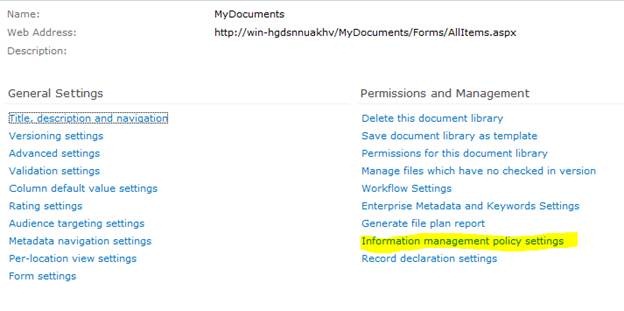
You
will be navigated to the document library settings page. Click on the
Information management policy settings from this page.

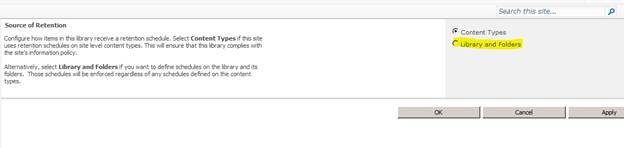
By
default a library will inherit its policies from the content type, so
that the policies set for the content type will be applied. You can
change this by overriding “Source of retention for this library”
property. For the purpose of demonstration I am going to set up
retention policy for “MyDocuments” library explicitly. Click on the
“change source” link.

You
will reach the configuration page for the retention schedule. Select
the libraries and folders radio button. You will receive a warning alert
stating the content type retention policy will be ignored. Click ok
here.

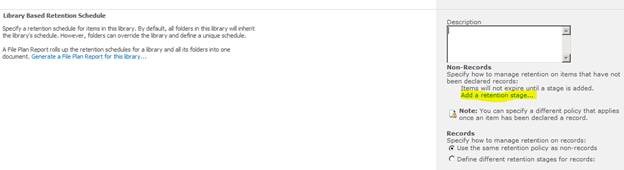
You can see the configuration options available for document library/list here. Click on “add a retention stage" link

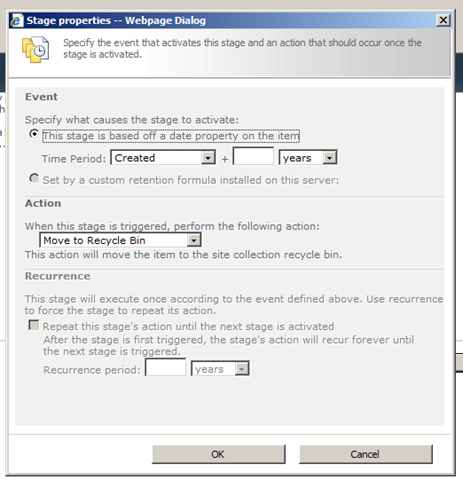
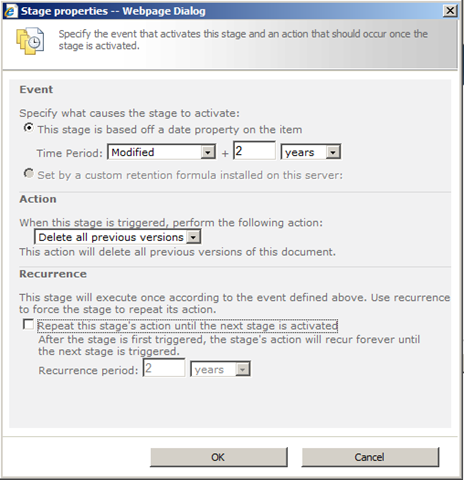
The
stage properties dialog will appear. Here I am going to add a stage
that checks the document modified date and if it is more than 2 years,
delete the previous versions.

In
the property window, see the first section – Event. This decides the
trigger condition for the stage to do some process. By default, you will
have the stage based on the date property. As I specified previously, I
need to select the time period as “date modified” and in the textbox
enter the value 2. In the action section, from the dropdown select
“delete all previous versions”. I don’t want to repeat this stage as I
will have another stage that deletes the item. So leave the checkbox
unchecked. Click ok to close the property window.

The
stage will be configured accordingly. Again click on the “Add a
retention stage” link. This time I will add rule, if created date is
greater than 3 years, delete the item. The configuration screen is as
follows.

Since
you are deleting the item, the recurrence option will be disabled.
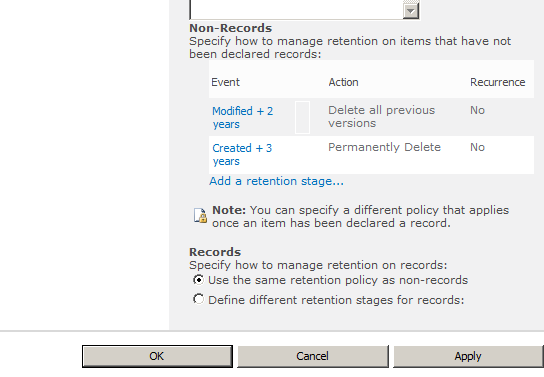
Click ok to create the stage. Your configured stages will be as follows.

For
the records option, leave the default selection as it is. Click on the
apply button, then click ok to return to the library settings page.

That’s
it. Now the documents placed in “MyDocuments” library will be expired
according to the above policy. The steps will be similar, if you want to
apply the retention/expiration policy for content type, you need to
navigate to the information policy management page of content type and
then perform the above steps.
http://weblogs.asp.net/sreejukg/archive/2010/11/11/retention-policy-for-document-library-in-sharepoint-2010.aspx
http://www.c-sharpcorner.com/uploadfile/anavijai/retention-policy-for-a-document-library-in-sharepoint-2010/


 Back to the top